How to Check Your H1–H6 Heading Outline
See how Cut Marketing structures its guides. Check your heading levels, compare the HTML title with the H1 and draft question headings for sections that answer them.
At Cut Marketing, the blog template puts each article’s title in an h1 and appends the site name to the HTML title. The guide’s main sections use h2 headings. Our XML sitemap guide, for instance, gives building, splitting and submitting the files their own sections. Readers can jump straight to the step they need. Cut Marketing’s XML sitemap guide
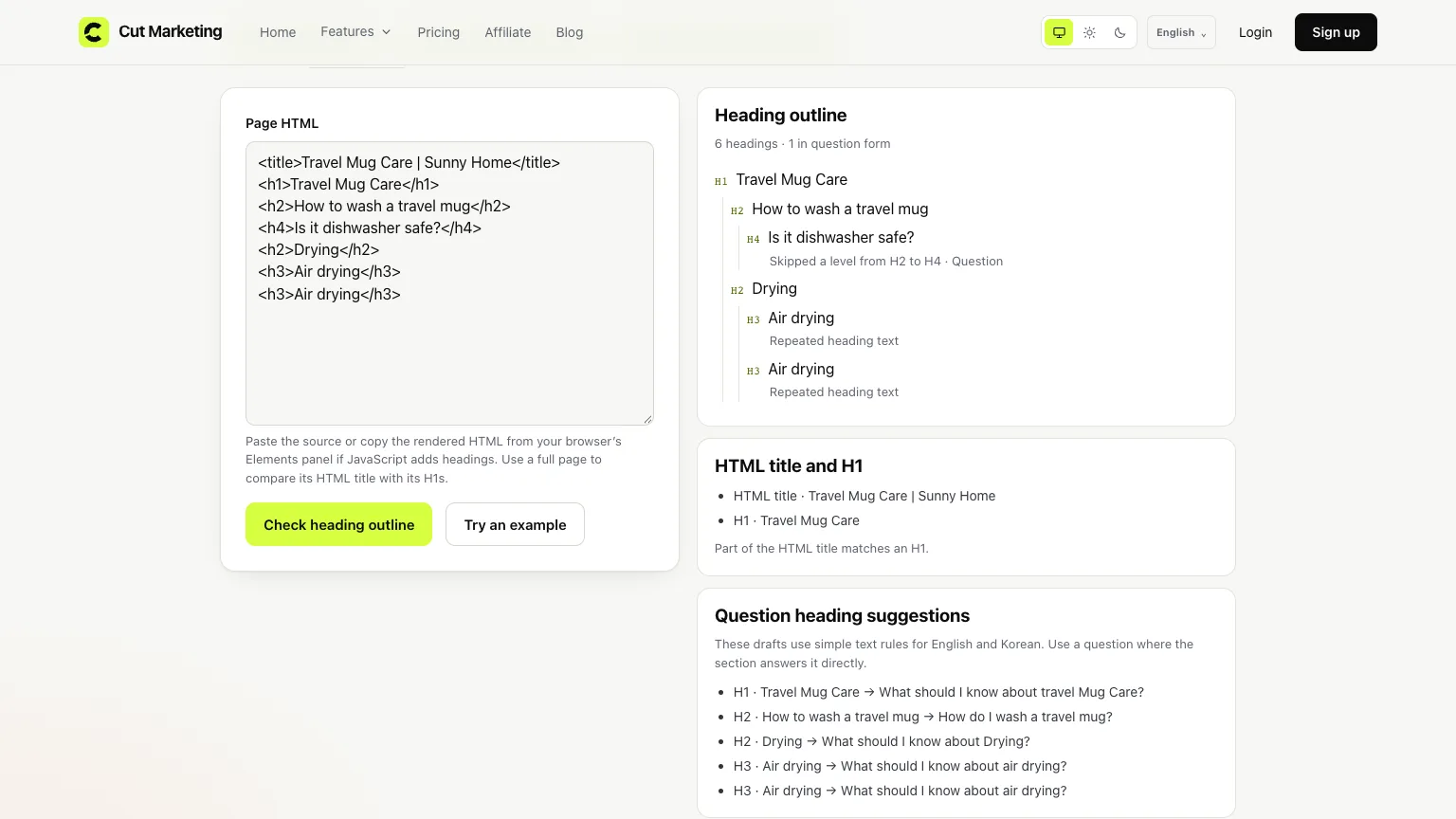
Our free heading outline checker reads pasted HTML in the browser. It shows what belongs under each heading, flags places to review and puts the HTML title beside every H1. If your site adds headings after loading, copy the rendered HTML from the browser’s Elements panel.
Read the outline from H1 to H6
Heading ranks mark sections and subsections. After an h2 called “Care instructions,” give its “Dishwasher safety” subsection an h3. A jump straight to h4 makes it hard to tell whether a subsection is missing. Then return to h2 for “Returns” to start a new section. W3C’s accessibility tutorial recommends reviewing jumps when opening subsections and allows ranks to jump back up when they close. Fixed regions such as a sidebar can keep consistent heading levels across pages. W3C WAI headings tutorial
Google Search says heading order does not matter to it and gives no ideal heading count. If the checker finds several H1s, check that readers still see one clear main title. Google’s title link guidance says it may use heading text and other prominent text to form a result’s title, so visual emphasis matters. Google’s SEO starter guide · Google’s title link guidance
Compare the title and H1, then review repeated text
The HTML title and page H1 can serve the same topic with different wording. Our guide title includes the site name in the browser tab. The visible heading uses just the article title. If the H1 says “Travel mug care” and the HTML title says “Shipping and returns,” check which topic belongs on the page before editing either one.
The checker flags empty headings and repeated phrases so you can spot labels left blank or copied from a template. It also flags headings over 100 characters as an editing prompt. A long heading may read more easily if the details move to the first sentence.
Turn a section into a question when it has an answer
On a product page, a section called “Dishwasher safety” could become “Can I put this mug in the dishwasher?” if its first line answers that question. Keep “Care instructions” as a broader label when the section covers several tasks. The tool recognizes question headings and suggests alternatives using English and Korean text rules. Read each draft against the section before using it.
Google applies ordinary SEO practices to AI Overviews and AI Mode. Its guidance requires the page to be indexed and eligible for a snippet to appear as a supporting link. Question headings are an editorial choice. Once the headings are in place, read the first sentence under each one and see whether it delivers the answer. Google’s AI features guidance · Cut Marketing’s guide to direct answer blocks