Product image to video: a camera study
Follow a fictional camera from an Indigo image to MiniMax H3 motion and a SeedVR2 1080p file. Inspect exact prompts, full-frame videos and measured delivery.
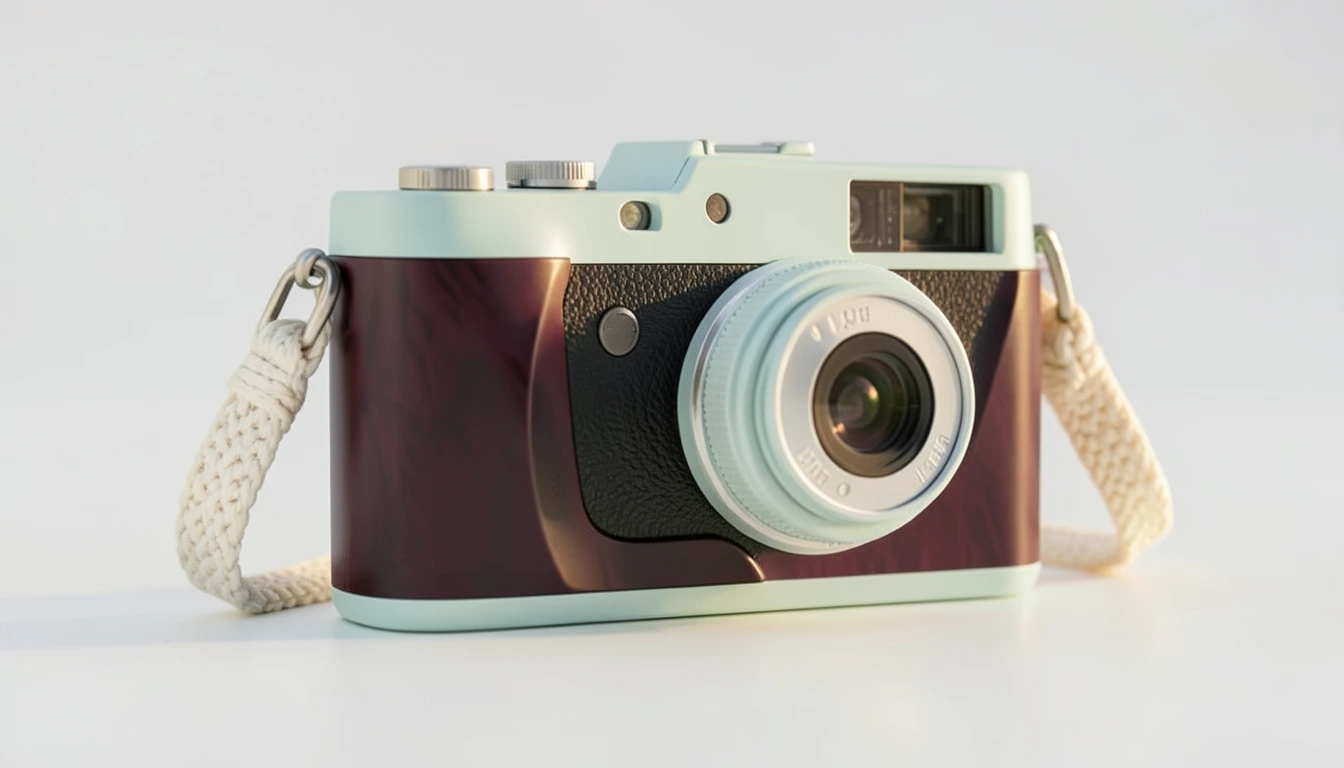
Here is the image we used, the short MiniMax H3 result and the 1080p SeedVR2 file made from that result. The camera is fictional. You can open the complete files and use the original prompts as a starting point for a reviewed creation.
Start with the camera image
Indigo produced the pale camera and woven strap shown above. We selected this full frame as the motion reference. The plum front panels, metal dials, lens rim and strap attachments give us specific details to follow through the video.
Open the reference image · Image production record
The exact image prompt:
Premium editorial product photograph of a fictional pale mint compact camera with a cream woven wrist strap, sculptural dark plum lacquer surface, a soft wash of warm daylight, exact physical camera proportions, close-up tactile metal and fabric, generous clean negative space, no text, no logo, no claims.Use the image prompt in Studio. The link fills the wording; choose your current model and settings before submitting.
Give the image a small amount of motion
We asked MiniMax H3 for a slow push-in and a soft change in light while keeping the camera still. Runway’s image-to-video guide describes motion-focused prompting for its own models. Our file below shows how this particular H3 request turned out.
Slow refined camera push-in toward the mint camera on the dark plum surface. A soft band of daylight moves subtly across the camera body and woven strap. Preserve exact camera shape and all product details; the product remains still, no morphing, no text, no logo.Open the motion prompt in Studio. Download the reference image above and select it separately in Reference. The link carries the prompt, and the final review controls generation.
Compare the 1080p file with its source
SeedVR2 received the actual H3 MP4 and the 1080p option. This operation used no text prompt. Watch the source and result at normal speed, then pause near the start, middle and end to follow the same details.
| File | Picture | Timing |
|---|---|---|
| H3 source | 896×512 | 124 frames · 24fps · 5.167s |
| SeedVR2 result | 1890×1080 | 124 frames · 24fps · 5.167s |
The table rounds duration; the files measure 5.166667 seconds. We requested 16:9 for motion, and the delivered source uses a 7:4 frame. The upscale keeps that frame. Check your final delivery format before preparing a vertical or 16:9 composition.
Review the details you intend to publish
The prompt asked for no text, but the generated image still contains small lens markings. We kept them visible in this study. They are unverified details. For a real SKU, compare the dial layout, strap mounts, material boundaries and wording with verified product references.
Add approved wording as real text during composition and inspect that final render. The exact ad-copy guide and product-video review guide cover those checks. This single fictional case does not establish real-product fidelity or advertising performance.
The published still includes prompt and AI-source metadata with its compressed picture unchanged. The public videos are silent full-frame copies; each retains its own stage’s encoded pictures and timing. Their production records distinguish original file hashes from published file hashes. Original downloads remain retained privately.
Use the workflow with current access and credits
The dedicated Video upscale workflow measures an owned MP4 and shows its current quote before submission. The 1080p operation needs eligible plan access; Free supports up to 720p. Paid checkout is currently closed. These operator-made samples do not define customer prices.
For two other actual source/result pairs, read the headphone and coffee-mug upscaling study. Keep a chosen direction attached to a product brief through the creative testing workflow.
Questions about this case
What does this product image-to-video case include?
It includes one fictional Indigo camera image, the MiniMax H3 motion result and the SeedVR2 1080p file made from that result. The full frames, exact prompts, measured dimensions and production records are available on this page.
Does opening a prompt start generation?
The link fills the original wording in Studio. Choose the reference image separately, review the model, settings and current credits, then submit from the final review action. Opening the link does not generate a file.
Can the generated lens markings be used as brand text?
The small lens markings are unverified generated details. Compare a real product with verified references and add approved wording as real text in the final composition. Review the composed result before publishing.