AI Virtual Try-On for Clothing Shops: We Tested It, From Garment Photo to Lookbook Video
We turned one garment photo into on-model photos, then turned the best one into a daily-life lookbook video. Real results, the cost per photo, which photos work, and what to check before you publish.
New arrivals often sit online as flat lays because a model shoot takes days to book. Cut Marketing now has a Fashion Workspace: turn one garment photo into on-model photos, then turn the best one into a daily-life lookbook video with one press. Here is exactly what we got when we tried it on 19 November 2026.
The short version:
- Model photo + garment photo → that model wearing the garment. No model photo? A fictional AI model wears it.
- One photo per shot: front full body, three-quarter view, daily snapshot, detail close-up.
- A 2k try-on photo costs 8 credits ($0.08). The 40 free credits of a new account make five.
- Make a lookbook video under any photo turns it into a walking clip.
Open Virtual Try-On · Open Lookbook Video
Our test: one linen shirt
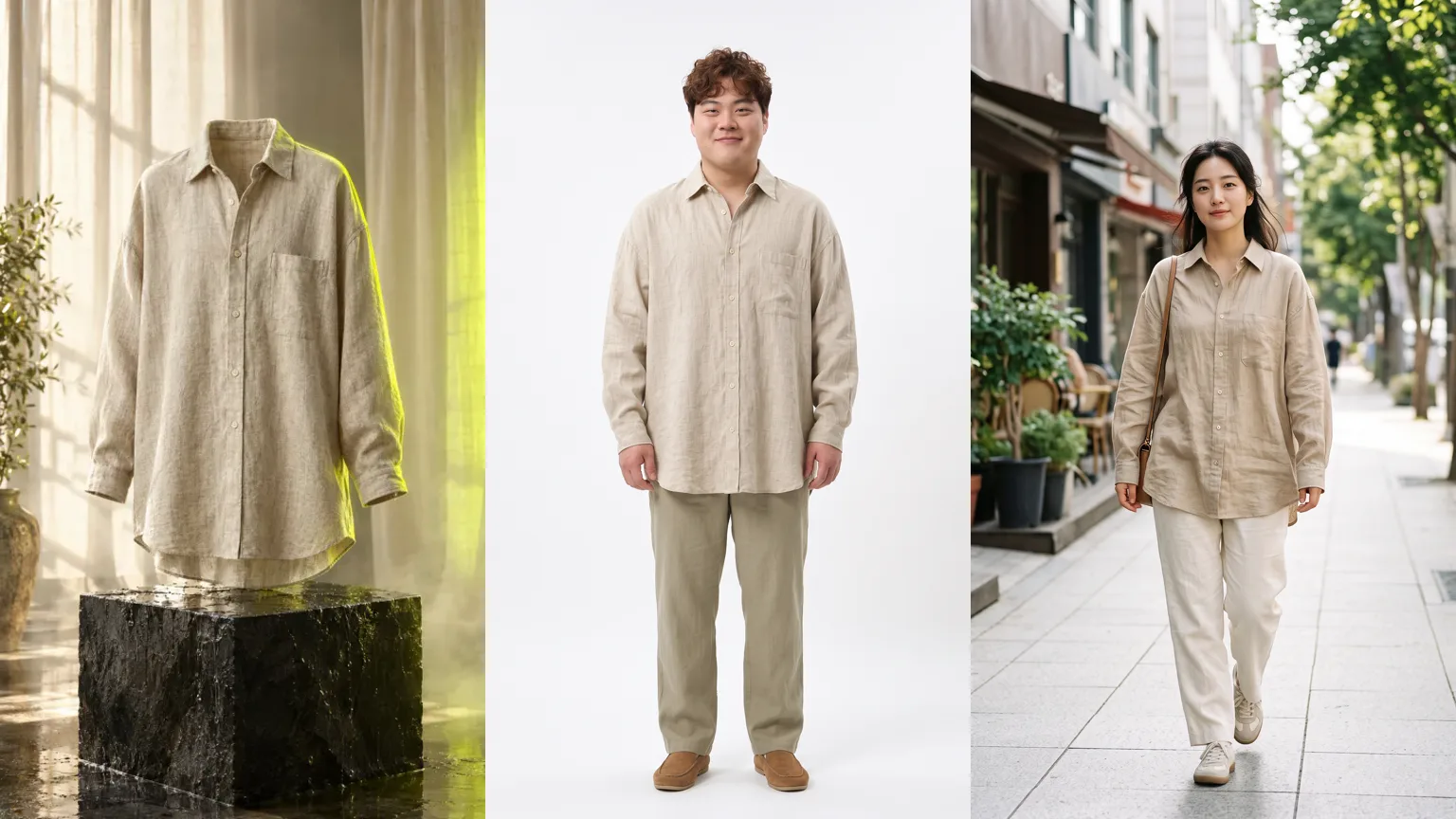
We used two inputs: a male model photo (waist-up) from the Cut Marketing AI actor library, and the linen overshirt product photo from our showcase.
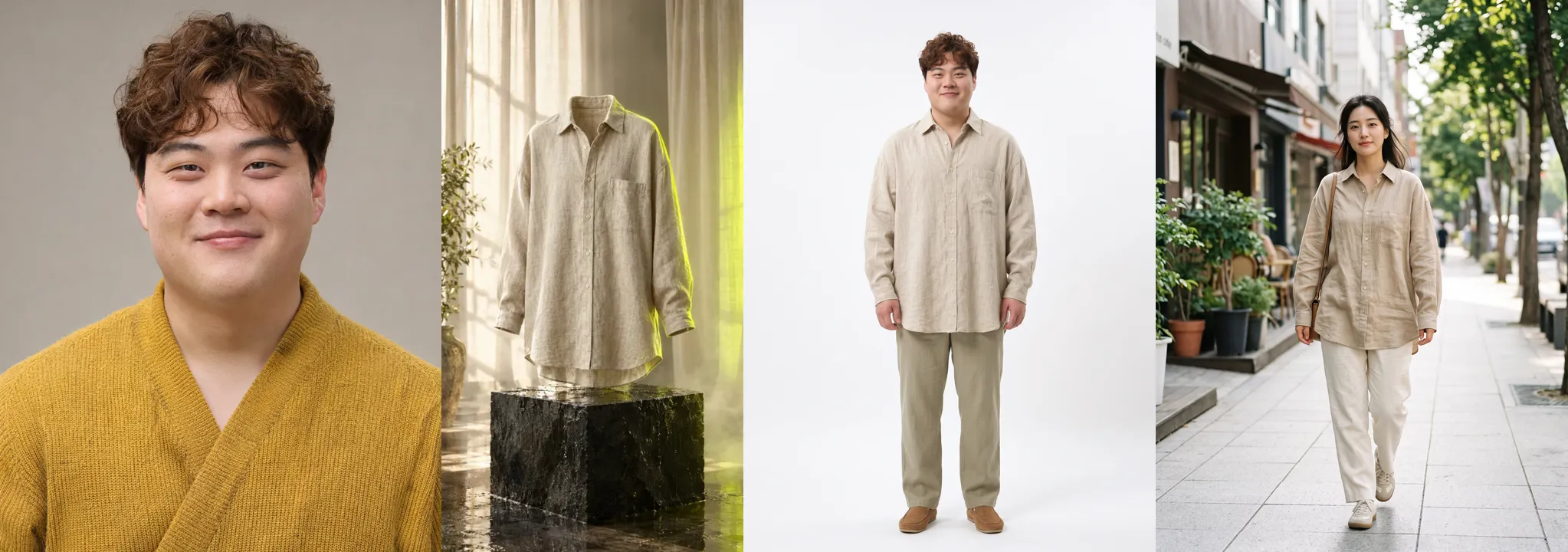
| Test | Input | Result | Cost |
|---|---|---|---|
| Dress my model | Male model photo + shirt photo | Front full body on white, 1792×2400 | 8 credits |
| Dress an AI model | Shirt photo only | Korean woman in her 20s, street snapshot, 1792×2400 | 8 credits |
| Lookbook video | The AI model photo | 5-second clip of her walking toward the camera | 100 credits |
What worked
- The face and hairstyle stayed exactly as in the model photo.
- The shirt’s beige color, chest pocket and the slubby linen texture and creases came through.
- The AI model mode produced a street snapshot that is ready for a social post from a single product photo.
What to watch
- From a waist-up photo, the AI made up the trousers and shoes. If the bottoms must be your own product, use a full-body photo or upload the bottoms too (up to three garments are worn together).
- Small logos and text can change. Compare with the real item before you put it on a product page.
From try-on photo to lookbook video
Press Make a lookbook video under a try-on photo and the video tool opens with that photo as the first frame. We chose the daily street walk style.
For all five seconds the shirt’s color, the fit and the face stayed the same. One thing to know: the video keeps the photo’s shape. A 3:4 try-on photo gave a 3:4 clip, so make the try-on photo in 9:16 if the video is for Reels or TikTok. There are six styles.
| Style | Best for |
|---|---|
| Daily street walk | Instagram Reels, new-arrival posts |
| Café moment | Mood posts, brand accounts |
| Mirror OOTD | TikTok and Reels outfit-of-the-day |
| 360° outfit turn | Product pages: front, side and back |
| Brand promo film | Seasonal campaigns and ads |
| Runway walk | Lookbook covers, shop banners |
To add captions, your shop name and music, open Finish the Ad and export 9:16, 1:1 and 4:5 at once.
How to use it (3 minutes)
- In the Cut Marketing studio, open Fashion → Virtual Try-On in the left menu.
- Choose My model photo or AI model. With your own model, upload one full-body photo and confirm you may use it. With an AI model, pick gender, age, look and body type.
- Upload up to three garment photos. Flat lays, hanger shots and product photos on white all work.
- Pick the shots, background and ratio, then generate. You get one photo per shot.
- Press Make a lookbook video on the photo you like and choose a style.
Photos that work, and photos that don’t
| Works well | Works poorly | |
|---|---|---|
| Garment photo | The whole item visible, flat lay or hanger shot, even light | Folded or cropped items, hard shadows |
| Model photo | Front-facing full body, nothing covering the body | Arms crossed, a bag covering the outfit |
| Details | Large patterns, solid colors, fabric texture | Tiny logos, text, complex embroidery |
Who it is for
- One-person shops without a model: add on-model photos to new arrivals that only have flat lays.
- Plus-size and menswear lines: show the same garment on AI models of different body types so customers see the fit on theirs.
- Shops with an in-house model: put a new piece on last season’s model photos and publish before the next shoot.
Check before you publish
- Compare with the real item: color, print, logo, buttons and length. These are the things returns are made of.
- Only photos of people who agreed: your own photo, or a model who consented. Without one, use the AI model.
- Say it is AI: a short note on the product page that the photos use an AI model avoids misunderstandings. Check your marketplace’s image policy too.
Frequently asked questions
What is AI virtual try-on?
AI virtual try-on puts a garment from a product photo onto a person in another photo, or onto a fictional AI model, so a shop gets on-model photos without a photo shoot. In Cut Marketing you upload a model photo (or choose an AI model) and up to three garments, pick front, three-quarter, snapshot or detail shots, and get one photo per shot.
Can I do it without a model photo?
Yes. Choose AI model and set gender, age, look and body type; a fictional model that resembles no real person wears your garment. In our test, one linen shirt photo became a street snapshot of a Korean woman in her 20s.
How much does one photo cost?
With the default Nano Banana 2.1 model, 6 credits ($0.06) at 1k and 8 credits ($0.08) at 2k; one credit is $0.01. The 40 free credits a new account gets cover five 2k try-on photos. GPT Image 2.6 is 16 credits at 2k, and the studio shows the exact total before you generate.
Do the garment’s color and details stay accurate?
In our test the shirt’s color, chest pocket and linen texture came through. Small logos, text and the number of buttons can change, so compare every photo with the real item before you publish. Garment photos with the whole item in even light give the most faithful result.
Can I make a video from the try-on photo?
Yes. Press Make a lookbook video under the photo and the video tool opens with it as the first frame. Choose daily street walk, café moment, mirror OOTD, 360° outfit turn, brand promo film or runway walk. Our 5-second 480p clip on Seedance 2.5 cost 100 credits ($1.00), and the clip keeps the photo’s aspect ratio.
Can I use someone else’s photo as the model?
Only your own photo or the photo of a person who agreed to its use in your shop’s images. The tool asks you to confirm this, and photos of celebrities or people who did not agree are not allowed. Without a model photo, the AI model mode is the safest choice.
Try it now
Sign up with Google and the 40 free credits make five 2k try-on photos right away. Start with one garment photo in Virtual Try-On. More: AI virtual try-on · AI lookbook video · Product detail pages