# Open Graph Checklist: Fix Link Previews on 5 Platforms (2026)
> Shared a link and got a bare URL with no image? Here are the og tags and image sizes Facebook, X, LinkedIn, KakaoTalk and Naver ask for in their own documentation, and a free…
# Open Graph Checklist: Fix Link Previews on 5 Platforms (2026)
Shared a link and got a bare URL with no image? Here are the og tags and image sizes Facebook, X, LinkedIn, KakaoTalk and Naver ask for in their own documentation, and a free checker that shows all five cards at once.
Published 2026-11-19 4 min read [Cut Marketing Team](/editorial)
Ever shared a product page in a chat and got a bare URL with no image? Link previews are built from the page’s **Open Graph tags**. One missing tag or an image of the wrong size, and the card turns into a plain link.
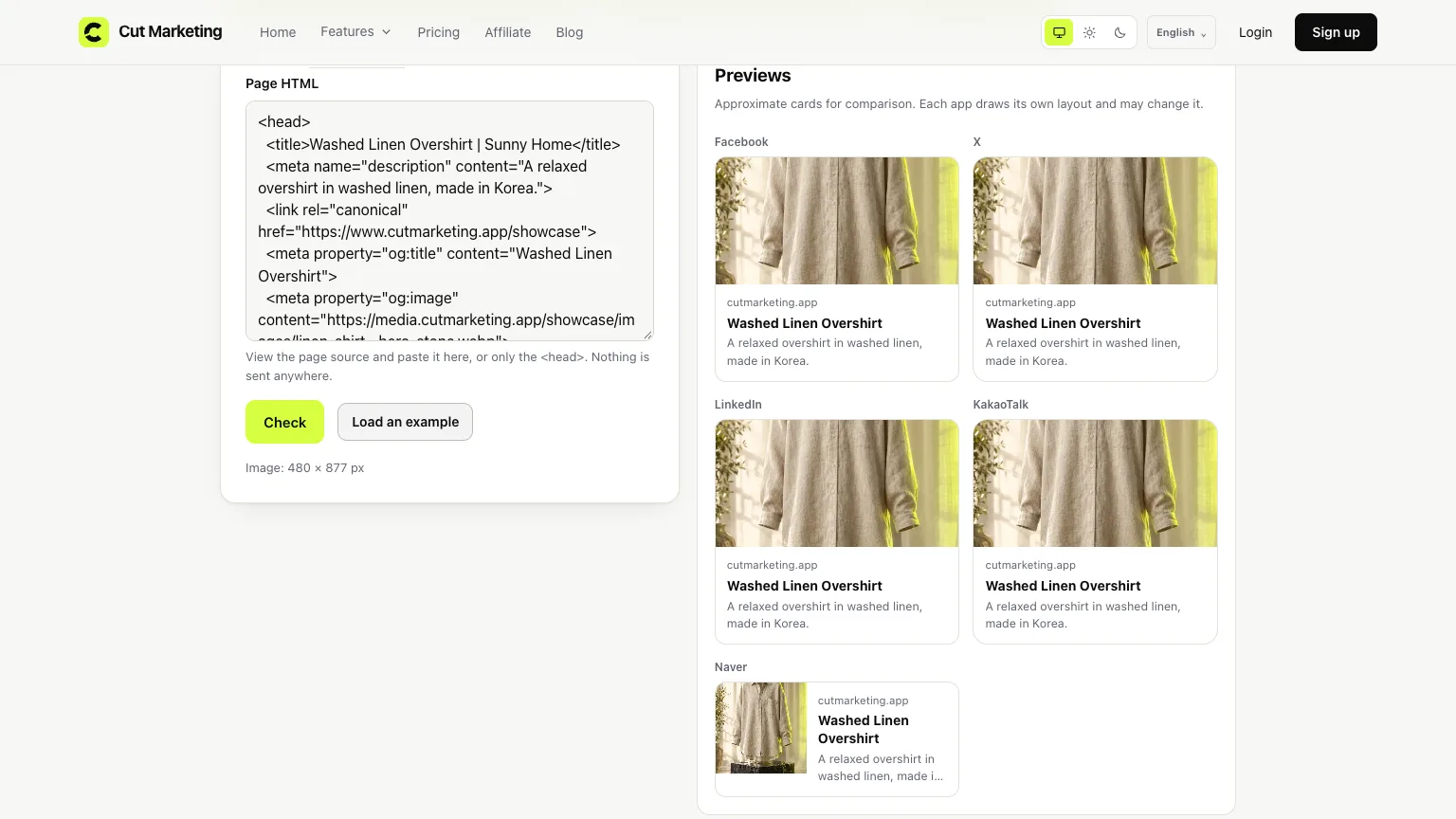
This guide collects only what Facebook, X, LinkedIn, KakaoTalk and Naver **write in their own documentation** (read 19 November 2026). We also built a [free link preview checker](/free-tools/link-preview-checker): paste the HTML and see all five cards at once.
**The short version:**
- The required tags are og:title, og:type, og:image and og:url. Add og:description and og:image:alt too.
- A **1200 × 630 JPEG or PNG** og:image passes every rule we found.
- og:image must be a full address starting with https://.
- If the old card still shows after a fix, it is the cache: refetch in the sharing debugger or change the image URL.
## Each platform’s official rules at a glance
| Platform | Tags it reads | Image rules | Source |
| --- | --- | --- | --- |
| Open Graph standard | og:title, og:type, og:image, og:url (required), og:image:alt (recommended) | No size set | [ogp.me](https://ogp.me/) |
| Facebook | og tags | JPEG, GIF or PNG; width and height tags recommended; no pixel size published | [Meta sharing best practices](https://developers.facebook.com/documentation/sharing/best-practices) |
| LinkedIn | og:title, og:image, og:description, og:url | At least 1200 × 627, 1.91:1, up to 5 MB; under 401 px wide shows as a thumbnail | [LinkedIn Help](https://www.linkedin.com/help/linkedin/answer/a521928) |
| KakaoTalk | og:title, og:description (up to 2 lines each), og:image, og:site\_name | At least 200 × 200, up to 5 MB | [Kakao Developers](https://developers.kakao.com/docs/ko/kakaotalk-share/common) |
| Naver | Recommends og:type, og:title, og:description, og:image, og:url | Larger than 150 × 150, at least 5,000 bytes, ratio within 3:1, unique to the page | [Naver Search Advisor](https://searchadvisor.naver.com/guide/markup-content) |
| X | twitter:card, twitter:title and others | The current developer docs publish no card rules | [docs.x.com](https://docs.x.com/) |
Naver notes that og:image can also be used as the page’s **thumbnail in Naver search results**, so this is about search visibility as well as sharing.
## A tag block you can copy
```
```
Keep og:url and the canonical link the same. If they differ, shares split between two addresses.
## We tested it: our own home page
We ran the checker on the Cut Marketing home page first. The required tags, a 1200 × 630 PNG, og:image:alt and twitter:card all passed. But **the og:title ended with the site name.** Meta asks for og:title “without any branding such as your site name”, because og:site\_name shows the name separately. We dropped the site name from our share titles straight away and added the rule to the checker.
## How to use the link preview checker
1. Open the page and **view its source** (Ctrl+U, or Option+Cmd+U on a Mac). Copy the HTML, or only the .
2. Paste it into the [link preview checker](/free-tools/link-preview-checker) and press **Check**.
3. You get card previews for Facebook, X, LinkedIn, KakaoTalk and Naver, and **what to fix** per platform with a link to the rule.
4. Copy the **fixed tags** into your . Values you already have are kept; only missing ones are filled.
5. Refresh the cache with the links to Facebook’s Sharing Debugger and LinkedIn’s Post Inspector.
## Six common reasons a preview fails
| Symptom | Cause | Fix |
| --- | --- | --- |
| Only the URL, no image | og:image missing or relative (/img.jpg) | A full https:// address |
| Small thumbnail on LinkedIn | Image under 401 px wide | Use 1200 × 630 |
| No thumbnail in Naver | 150 × 150 or smaller, under 5,000 bytes, ratio over 3:1, a site-wide logo | A unique 1200 × 630 image per page |
| No image on Facebook | A format outside JPEG, GIF, PNG; no width and height tags | JPEG or PNG + og:image:width and height |
| The old card after a fix | The app’s cache | Refetch in the debugger, change the image URL |
| Title cut off in KakaoTalk | Title and description show up to 2 lines each | Put the key words first |
## No preview image yet?
On a card, the image does most of the work. If you have a product photo, make a 1200 × 630 preview image in the [Cut Marketing image generator](https://app.cutmarketing.app/studio/image-generator?ui_locale=en). The 40 free credits you get at sign-up cover several images.
## Frequently asked questions
### Which Open Graph tags are required?
The Open Graph protocol (ogp.me) names four required properties: og:title, og:type, og:image and og:url, and says a page with og:image should also have og:image:alt. LinkedIn also asks for og:description, and Naver recommends og:type, og:title, og:description, og:image and og:url together.
### What size should og:image be?
1200 × 630 passes every rule we found. LinkedIn asks for at least 1200 × 627 at 1.91:1 and up to 5 MB. Naver wants larger than 150 × 150, at least 5,000 bytes and a ratio no wider than 3:1. KakaoTalk takes up to 5 MB and at least 200 × 200. Meta’s sharing docs give no pixel size for link previews.
### I fixed the tags but the old preview still shows. Why?
Apps cache the card they fetched first. Meta says images are cached based on the URL and won’t be updated unless the URL changes. Refresh Facebook through the Sharing Debugger and LinkedIn through Post Inspector; for KakaoTalk, a new image file name (URL) is the surest fix.
### Should og:title include my site name?
Meta asks for og:title without branding such as the site name; put the name in og:site\_name instead. When we ran our own checker on the Cut Marketing home page, its og:title ended with the site name, so we fixed it.
### Can I use a WebP image for the Facebook preview?
Meta’s sharing best practices list og:image:type as image/jpeg, image/gif or image/png. To be safe, give the shared og:image as JPEG or PNG.
### Is the link preview checker free?
Yes, with no account and no usage limit. The pasted HTML is read in your browser and never sent to our server; the only request is your browser loading og:image once to measure it.
## Keep reading
[Check Canonical Tags Before Release](/blog/canonical-tag-checker-guide): Compare HTML and HTTP canonicals with hreflang and Open Graph URLs. Find unexpected changes before you release a page.
[How to Check Image Alt Text in HTML](/blog/image-alt-text-guide): Find missing alt text, unnamed image links and filenames used as descriptions. Decide what to write with examples for product photos and decorative images.
[How to Check Internal Links and Anchor Text](/blog/internal-link-anchor-text-guide): Find vague labels, unnamed image links and missing destinations in your HTML. Learn which flags to fix first and when context is enough.
## Make the next ad in minutes.
Start with a product image or a short brief. The studio shows the credit cost before you generate.
[Open studio](https://app.cutmarketing.app/?ui_locale=en)