# How to Check Image Alt Text in HTML — Cut Marketing
> Find missing alt text, unnamed image links and filenames used as descriptions. Decide what to write with examples for product photos and decorative images.
# How to Check Image Alt Text in HTML
Find missing alt text, unnamed image links and filenames used as descriptions. Decide what to write with examples for product photos and decorative images.
Published 2026-11-23 2 min read [Cut Marketing Team](/editorial)
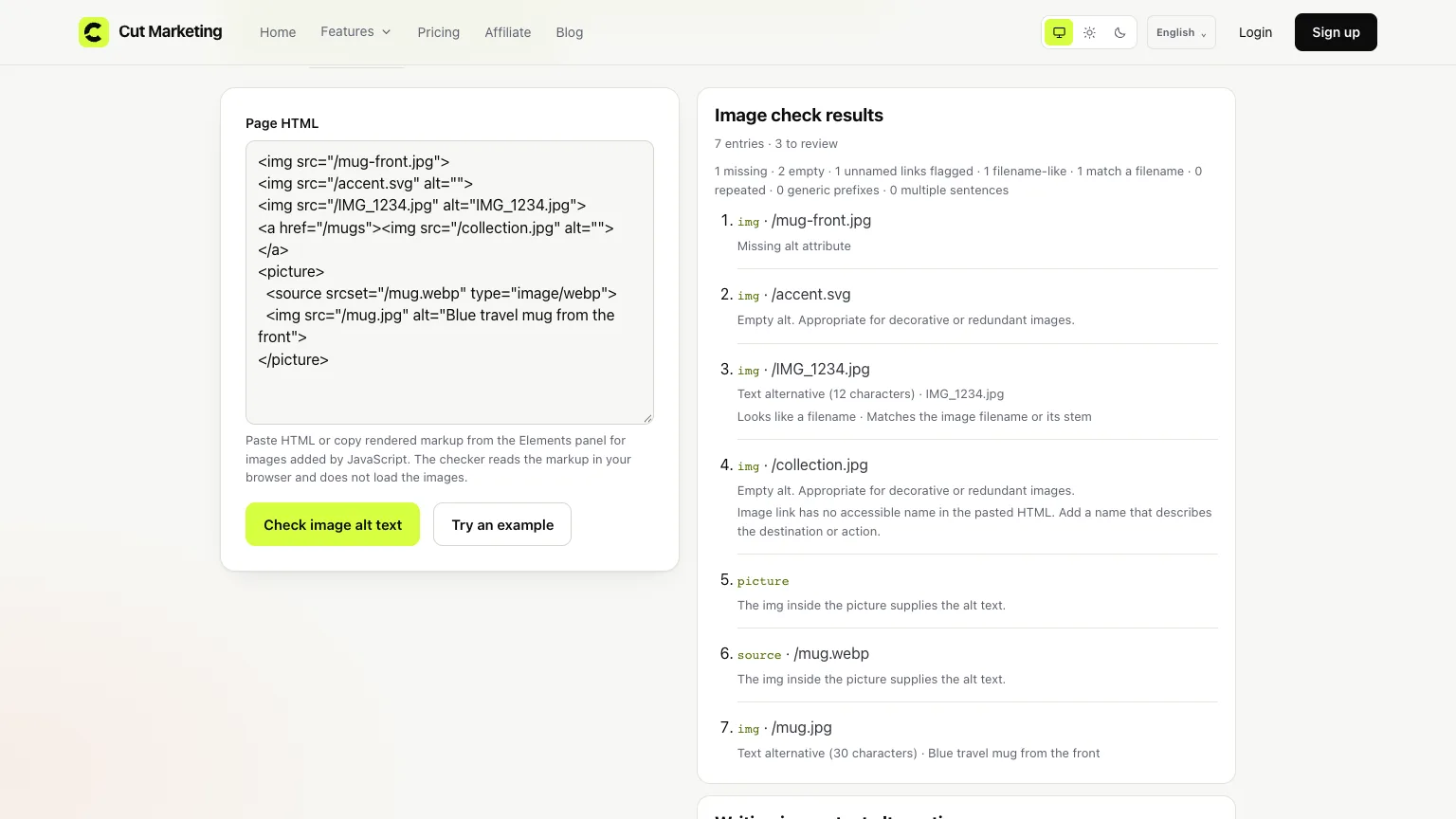
Open the [free image alt text checker](/free-tools/image-alt-text-checker) and paste HTML from a product page or article. It lists the images in page order and flags missing values, repeated descriptions, filenames and image links that appear to have no accessible name. The check runs in your browser. For images added after the page loads, copy the rendered HTML from the Elements panel.
## Start with what the image adds
Think of a travel mug listing with two photos. The first could use `Blue travel mug with the lid on`. For the close-up, `Sliding lid shown in the open position` tells the reader what the second photo adds. A decorative divider can have an empty `alt` attribute. If the page already provides the same information in nearby text, an empty value may also be appropriate. [W3C WAI images tutorial](https://www.w3.org/WAI/tutorials/images/) · [WAI alt decision tree](https://www.w3.org/WAI/tutorials/images/decision-tree/)
Google uses text alternatives, page content and computer vision to understand the subject of images. It recommends useful descriptions in the context of the page and advises against keyword stuffing. Replace camera filenames such as `IMG_1234.jpg` with a description that helps the reader. Review repeated text when two photos show different details. [Google Search Central’s image SEO guidance](https://developers.google.com/search/docs/appearance/google-images)
## Name the link or action
If an image is the only content in a link to your mug collection, `Shop all travel mugs` explains where the link leads. When the link already has those words as visible text, the image can have empty `alt`. An image-only link needs an accessible name, and a non-text control needs a name that describes its purpose. Check the rendered page in the browser’s accessibility panel after editing. [WCAG 1.1.1 guidance](https://www.w3.org/WAI/WCAG22/Understanding/non-text-content.html) · [W3C guidance on unnamed image links](https://www.w3.org/WAI/WCAG22/Techniques/failures/F89)
## Put the important detail first
W3C WAI recommends a short phrase or sentence and usually skips generic openings like “image of”. The checker marks multi-sentence descriptions for review. For a chart or a product comparison with several measurements, use a short alternative to identify it and add a fuller description or accessible table nearby. For responsive images, put the alternative on the `img` inside `picture`. The `source` elements supply the variants. [W3C WAI writing tips](https://www.w3.org/WAI/tutorials/images/tips/)
## Keep reading
[How to Check Internal Links and Anchor Text](/blog/internal-link-anchor-text-guide): Find vague labels, unnamed image links and missing destinations in your HTML. Learn which flags to fix first and when context is enough.
[How to Compare Source and Rendered HTML](/blog/source-vs-rendered-html-guide): Find the headings, paragraphs and metadata that appear after JavaScript runs. Compare the two HTML snapshots in your browser.
[How to Check Structured Data](/blog/structured-data-checker-guide): Find JSON-LD syntax errors and missing properties in your browser, then review the FAQ markup you can make from the page.
## Make the next ad in minutes.
Start with a product image or a short brief. The studio shows the credit cost before you generate.
[Open studio](https://app.cutmarketing.app/?ui_locale=en)