# hreflang Tags: Lessons From a Site in 30 Languages (2026)
> How hreflang works according to Google's own guide: the three ways to add it, x-default, valid language and region codes, and the return-link rule that silently breaks most setups.
# hreflang Tags: Lessons From a Site in 30 Languages (2026)
How hreflang works according to Google's own guide: the three ways to add it, x-default, valid language and region codes, and the return-link rule that silently breaks most setups. With a free generator and checker.
Published 2026-11-20 5 min read [Cut Marketing Team](/editorial)
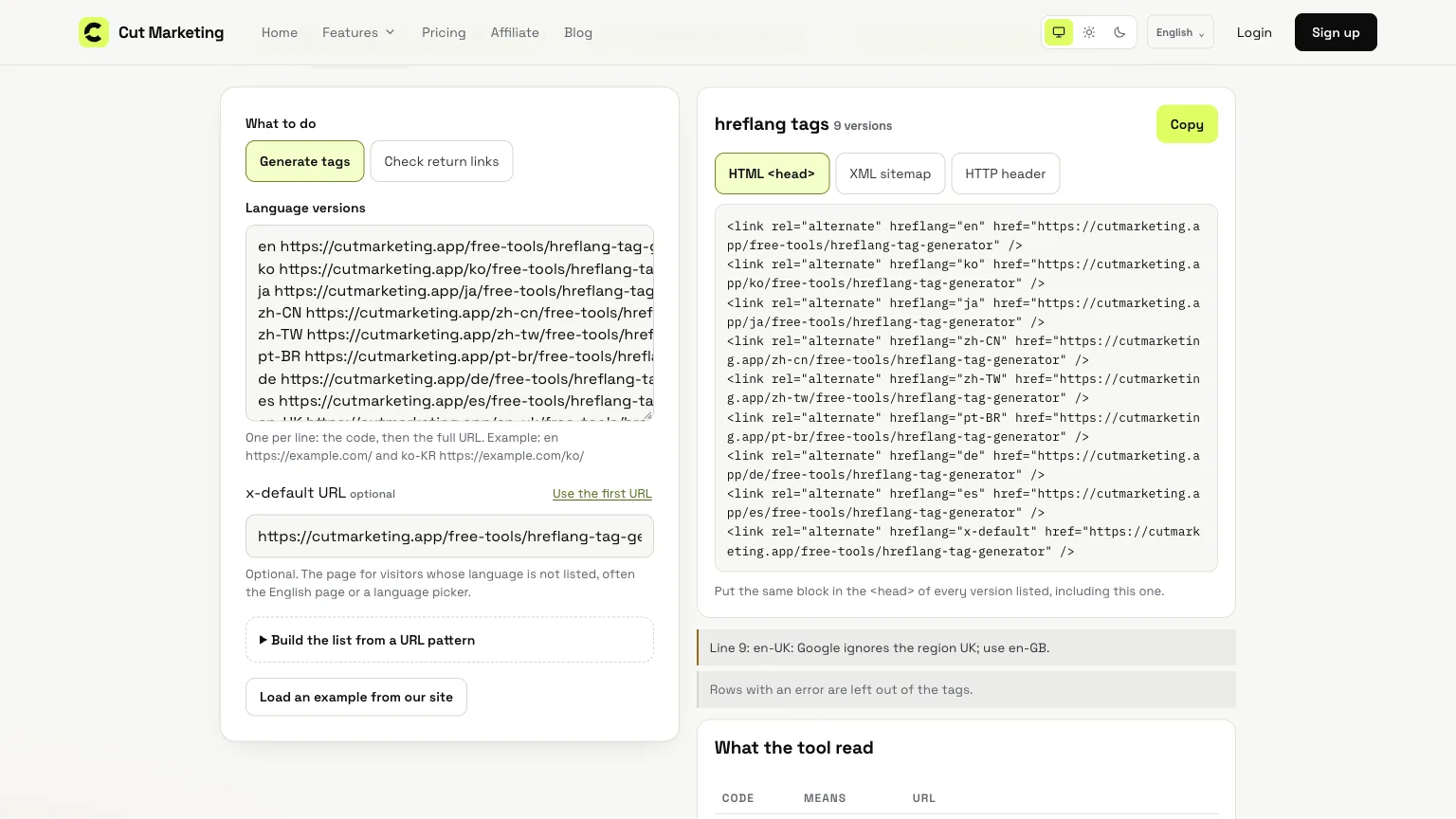
Cut Marketing runs in **30 languages**, so every page on our site carries 31 hreflang tags: one per language plus x-default. Getting those right matters to us every day, and the rules are stricter than most guides make them sound.
This guide sticks to what Google **writes in its own documentation**, [“Tell Google about localized versions of your page”](https://developers.google.com/search/docs/specialty/international/localized-versions) (read 20 November 2026). We also built a [free hreflang tag generator and checker](/free-tools/hreflang-tag-generator) that applies the same rules.
**The short version:**
- Each version lists **itself and every other version**. If two pages don’t point to each other, Google ignores the pair.
- Codes are an **ISO 639-1 language**, optionally followed by an **ISO 3166-1 alpha-2 region** (en-GB) or a **script** (zh-Hant).
- A country code alone (us, jp) is not valid. en-UK and es-419 do not work.
- URLs must be **full addresses** that start with https:// (Google calls them fully qualified).
- x-default covers visitors whose language you do not list.
## How our site does it
| Choice | What we do |
| --- | --- |
| Method | HTML link tags in the head of every page |
| Tags per page | 31: 30 languages and x-default |
| Codes | Language only for most (de, ja, ko), with a region where we have one (zh-CN, zh-TW, pt-BR) |
| x-default | The English page |
| Pages in one language only | Our Korean-only posts carry ko and x-default only |
| Sitemap | No hreflang there: we picked one method |
We pasted all 30 language versions of two of our pages (pricing and the schema generator) into the checker. Each carried 31 tags, every version listed itself, and all 870 return links in each set were there. It did flag one code of ours: **fil** for Filipino. That is an ISO 639-2 code, and Google’s guide lists only ISO 639-1 codes; the closest ISO 639-1 code is tl (Tagalog). So on 2026-11-21 we changed our Filipino hreflang value to tl and kept the /fil/ addresses as they were. Catching that kind of thing is exactly what the checker is for.
## The three methods
Google says the three methods “are equivalent from Google’s perspective”, and “While you can use all three methods at the same time, there’s no benefit in Search.”
**1\. HTML link tags** in the head of every version:
```
```
**2\. XML sitemap**, with the xhtml namespace and one url element per page, each listing every version including itself:
```
https://example.com/ko/
```
**3\. HTTP Link header**, which Google describes as useful for files without HTML, such as PDFs:
```
Link: ; rel="alternate"; hreflang="en", ; rel="alternate"; hreflang="ko"
```
The [generator](/free-tools/hreflang-tag-generator) writes the same set in all three forms, so you can switch with one click.
## Codes: what Google accepts
| Write | Means | Google’s rule |
| --- | --- | --- |
| de | German, any region | Valid: ISO 639-1 language |
| en-GB | English for the UK | Valid: language plus ISO 3166-1 alpha-2 region |
| zh-Hant | Chinese, traditional script | Valid: script in ISO 15924 |
| zh-Hans-US | Simplified Chinese for the US | Valid: language, script, region |
| us | (a country alone) | Not valid: “You can’t specify the country code by itself” |
| en-UK | (meant UK) | No effect: use en-GB |
| es-419 | (Latin America) | Not supported |
| be | Belarusian, not Belgium | Google’s own example of a common mistake |
Google also says the value is **case-insensitive**, so en-gb and en-GB are the same. The generator writes the tidy form and shows what each code means in your language, which catches mistakes like **kr** (that is Kanuri; Korean is ko) before they go live.
## The return-link rule
> “If two pages don’t both point to each other, the tags will be ignored.”
This is the easiest rule to break. A team adds a new language page with its own tags but forgets to add it to the older pages, or one page lists /ja while the other lists /ja/. Google compares the addresses as written, so a trailing slash counts.
The checker’s **Check return links** mode takes the tags from several pages at once (paste each page’s head, sitemap lines or Link header) and tells you, page by page:
- whether the page lists itself
- which checked pages do not link back
- which links differ only by a trailing slash
- where one page calls another en while that page calls itself en-US
## x-default
Google: “The reserved x-default value is used when no other language/region matches the user’s browser setting.” Its guide does not make it required, so the checker suggests it without counting it as an error. Point it at a language picker or at your main language. Ours points to English.
## Naver and Bing
We looked for hreflang in [Naver Search Advisor’s webmaster guide](https://searchadvisor.naver.com/guide) and [Bing’s Webmaster Guidelines](https://www.bing.com/webmasters/help/webmasters-guidelines-30fba23a) on 20 November 2026 and found no mention of it, so we make no claim about how they use it. The rules in this guide and in the tool are Google’s.
## A translated page needs ads in the same language
hreflang brings each visitor to the right language. The ads that send them there should speak it too. The [Cut Marketing studio](https://app.cutmarketing.app/studio/create-video-ad?ui_locale=en) works in the same 30 languages: make product videos and images for each market from one product photo, then launch them on Meta, Google Ads and TikTok from one place.
## Frequently asked questions
### What does hreflang do?
It tells Google which URL is the version of a page for a given language, and optionally a region, so searchers get the version in their language. Google says it does not use hreflang or the HTML lang attribute to detect the language of a page.
### What are return links in hreflang?
Every page in a set must list itself and all the other versions. Google says that if two pages don’t both point to each other, the tags will be ignored, so one missing return link drops that pair.
### Is en-UK a valid hreflang code?
No. Google says reserved codes such as UK, EU and UN have no effect in hreflang. The ISO 3166-1 code for the United Kingdom is GB, so write en-GB.
### Can I use es-419 for Latin American Spanish?
Google says codes outside ISO 639-1 and ISO 3166-1 alpha-2, such as es-419, are not supported. List the countries instead, such as es-MX and es-AR, or use plain es.
### Should I put hreflang in the HTML, the sitemap or the HTTP header?
Google calls the three methods equivalent and says using all three brings no benefit in Search. Pick one: HTML tags are easiest to check, a sitemap keeps the head light with many languages, and the HTTP header is for files without HTML such as PDFs.
### Is the hreflang generator free?
Yes, with no account and no limit. It runs in your browser and nothing you type is sent to our server.
## Keep reading
[Check Canonical Tags Before Release](/blog/canonical-tag-checker-guide): Compare HTML and HTTP canonicals with hreflang and Open Graph URLs. Find unexpected changes before you release a page.
[How to Check Image Alt Text in HTML](/blog/image-alt-text-guide): Find missing alt text, unnamed image links and filenames used as descriptions. Decide what to write with examples for product photos and decorative images.
[How to Check Internal Links and Anchor Text](/blog/internal-link-anchor-text-guide): Find vague labels, unnamed image links and missing destinations in your HTML. Learn which flags to fix first and when context is enough.
## Make the next ad in minutes.
Start with a product image or a short brief. The studio shows the credit cost before you generate.
[Open studio](https://app.cutmarketing.app/?ui_locale=en)